

插件介绍
A pre-execution guard for AI coding agents. It blocks destructive Git and file system commands, plus common attempts to access sensitive files, before a tool call runs. Supports Amp Code, Antigravity CLI, Claude Code, Codex, Cursor, DeepSeek Harness, Devin CLI, GitHub Copilot CLI, Grok Build, Hermes Agent, Kimi Code, OpenClaw, OpenCode, and Pi.
项目详情摘要
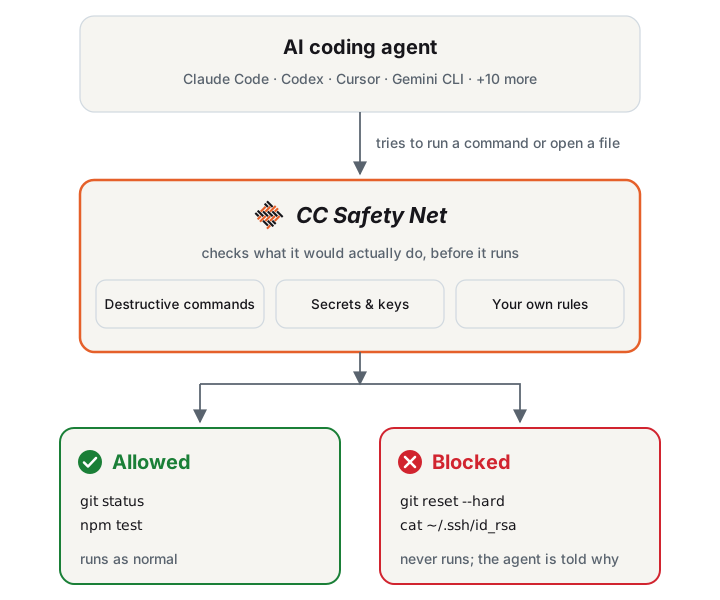
English** · 简体中文 · 日本語 https://github.com/user-attachments/assets/928dbe97-31e3-41d1-b35a-7941a701b056 CC Safety Net (Coding CLI Safety Net) blocks destructive commands and access to secrets such as SSH keys and `.env` files before the tool call runs. It parses what the command does. Wrapping the command or reordering flags does not hide it. A broken config file never blocks anything. It is not a sandbox: it does not contain processes, set filesystem permissions, or watch network egress. [!NOTE] **Full documentation →** covers installation, configuration, reference material, guides, and the security model. This README is the short version. How it works Supported coding CLIs CC Safety Net supports these coding agent CLIs on Windows, macOS, and Linux. Amp Code Antigravity CLI Claude Code Codex Cursor DeepSeek Harness Devin CLI Factory Droid Gemini CLI GitHub Copilot CLI Grok Build Hermes Agent Kimi Code OpenClaw OpenCode Pi Features **Blocks destructive commands** such as `git reset --hard`, `git push --force`, and `rm -rf` on dangerous targets, even inside `bash -c` or `python -c`. See Blocked Commands. **Blocks secret access** to SSH keys, `.env` files, `~/.aws`, and coding-CLI credentials, from the shell and from the agent's file tools. See Secret Protection. **Tunes the policy in a GUI.** Run `npx cc-safety-net gui` to pick the Standard, Strict, or Paranoid preset and turn rules on or off. See Modes. **Adds blocks through rulebooks**: official packs for Terraform, AWS, gcloud, and Azure, or your own JSON. See Official Rulebooks. **Shares policy through git.** Commit `.cc-safety-net/` so clones and cloud sessions get the same rules. See Team Setup. **Embeds in your own tools.** Call `checkCommand` from Node.js without installing the hook. See Library API. Quick start Y
摘自项目公开 README,可能随上游仓库更新。安装方法
建议先在测试 Profile 中安装,并检查权限、安装脚本和依赖。
npx -p @deepseek-ai/dsh dsh plugin --profile web add github:kenryu42/cc-safety-net
使用前检查
- 确认项目符合 DSH bundle 规范,而不只是相关仓库。
- 阅读许可证和安装脚本,检查网络、文件及执行权限。
- 备份配置,并确保插件能够安全卸载或回滚。